
NEW
4:04
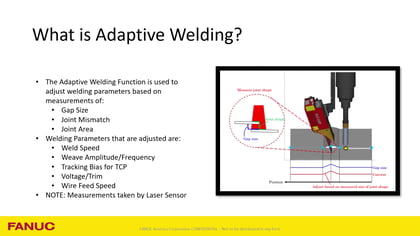
Adaptive welding can help robotic welding systems respond to changing joint conditions, improving weld quality and consistency without requiring manual adjustments throughout the process. In this Tech Short, we will walk through the process of enabling Adaptive Welding on FANUC R-30iB Plus controllers and show where the feature can be accessed within ArcTool weld procedures.
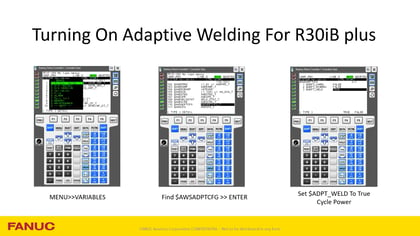
This video provides a practical overview of the steps required to activate Adaptive Welding and prepare your robotic welding system for advanced sensor-driven weld parameter adjustments. We will cover the controller setup process, including the required startup mode, system variable configuration, and controller restart procedures needed to make the functionality available.
Once Adaptive Welding has been enabled, we will explore where the feature appears within the weld procedure interface and review the key settings that support its operation. While this session focuses on activation and accessibility, it also serves as a foundation for future setup and configuration topics that build upon these initial steps.
For manufacturers and automation professionals using FANUC robotic welding systems, understanding how to properly enable Adaptive Welding is an important first step toward leveraging technologies such as laser seam tracking, automated weld parameter adjustment, and adaptive process control. Whether you are preparing for a new robotic welding installation or looking to expand the capabilities of an existing cell, this overview provides the information needed to get started.
This Tech Short is designed for welding engineers, robot programmers, maintenance personnel, and automation specialists who want to better understand the configuration process and prepare their systems for adaptive welding applications.
Requirements
Before enabling Adaptive Welding, you should have:
What You'll Learn
Register to watch the full Tech Short and learn how to activate Adaptive Welding on FANUC R-30iB Plus controllers, enabling the foundation for smarter, more responsive robotic welding applications.


