Python Programming on the R-50iA Controller
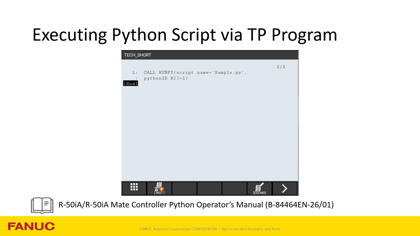
Boost automation with Python on FANUC R-50iA controllers. Learn script execution, data handling, and integration tips for robotics workflows.
The FREE official resource for learning FANUC, created by FANUC Engineers!
Boost automation with Python on FANUC R-50iA controllers. Learn script execution, data handling, and integration tips for robotics workflows.
How to configure a restricted DCS (Dual Check Safety) zone with a speed check on a CRX robot using the Tablet Teach Pendant. It shows how to limit robot speed in designated areas to ensure safe collaborative operation.
Discover how to configure a FANUC CRX-Series collaborative robot to perform screw tightening functions.
This video describes the process for changing batteries on all CRX robot models.
Tutorial for the SCARA and CRX robots on mode select function, operation modes and how to set up mode select functions and hardware for your system. This includes setting up the switch box and teach pendant to switch operation modes.
Auto Status Check is a feature on every FANUC collaborative robot that helps ensure safe, consistent performance of the power and force limiting functions. This tech short explains how Auto Status Check works and how to manage or modify it if required by your application.
Discover how to manage unknown payloads with FANUC CRX cobots! Understand why payload accuracy is crucial for safe and successful operation.
Sterling introduces the extended palletized icon, a versatile tool designed for stacking and unstacking workpieces in various configurations.
Discover how to use FANUC’s CRX wrist button feature for hands-free teaching! Customize settings, follow safety steps, and take advantage of all 5 wrist functions.
The Palletize Icon is used to stack or unload work pieces. By teaching three positions, you define a plane where the pick or drop position is calculated based on the number of rows, columns, and part height configured.
This video describes how to set up the touch skip icon and use it to stack a group of parts.
This video describes how to set up and perform a face match using the face match icon on the CRX and the CRX integrated sensor.
This Tech Short demonstrates CRX Contour Sanding, which involves sanding the outline of an object, including any bumps or curves.
Explore FANUC’s CRX Palletizing Mode! Learn how to enable it via Tablet TP, Manual Guided Teaching, or iPendant, along with tips & troubleshooting.
How to set up high-speed mode using Tablet TP.
This video describes how to set up a shaft insert using the force insert icon on the CRX collaborative robot.
Learn how FANUC’s Low Sensitivity icon helps robots handle unknown or varying weights! Watch a demonstration to see it in action and learn to apply effectively.
This video highlights how to configure a payload change distance. Payload change distance is an area limit you define where contact stop is disabled when switching payloads to allow the robot time to account for the change in force it experiences.
This tutorial describes how to create and configure Working Safety Zone around CRX robots using Tablet TP. It also shows how to setup User Target Model around End of Arm Tooling, so it can prevent robot and End of Arm Tooling from moving beyond the configured Working Safety Zone.
How to wire external devices such as conveyor and part presence sensor into a CRX controller and how to interact with them thru robot program.
Learn how to set up and troubleshoot constant push on the CRX Collaborative Robot.
Get more details on CRX Plug-ins and how they are installed.
How to update a CRX Controller using the Tablet Teach Pendant.
An introduction on how to use Manual Guided Teaching on the CRX collaborative robot.
A step-by-step guide to setting up payload on a CRX, using the Utool Payload Setup tool included in every CRX.
Showing 1-24 of 24 results